Turn Your Audio Into
Roblox-Ready Music
Process, preview, and publish your audio to Roblox with a simple creator-focused workflow.
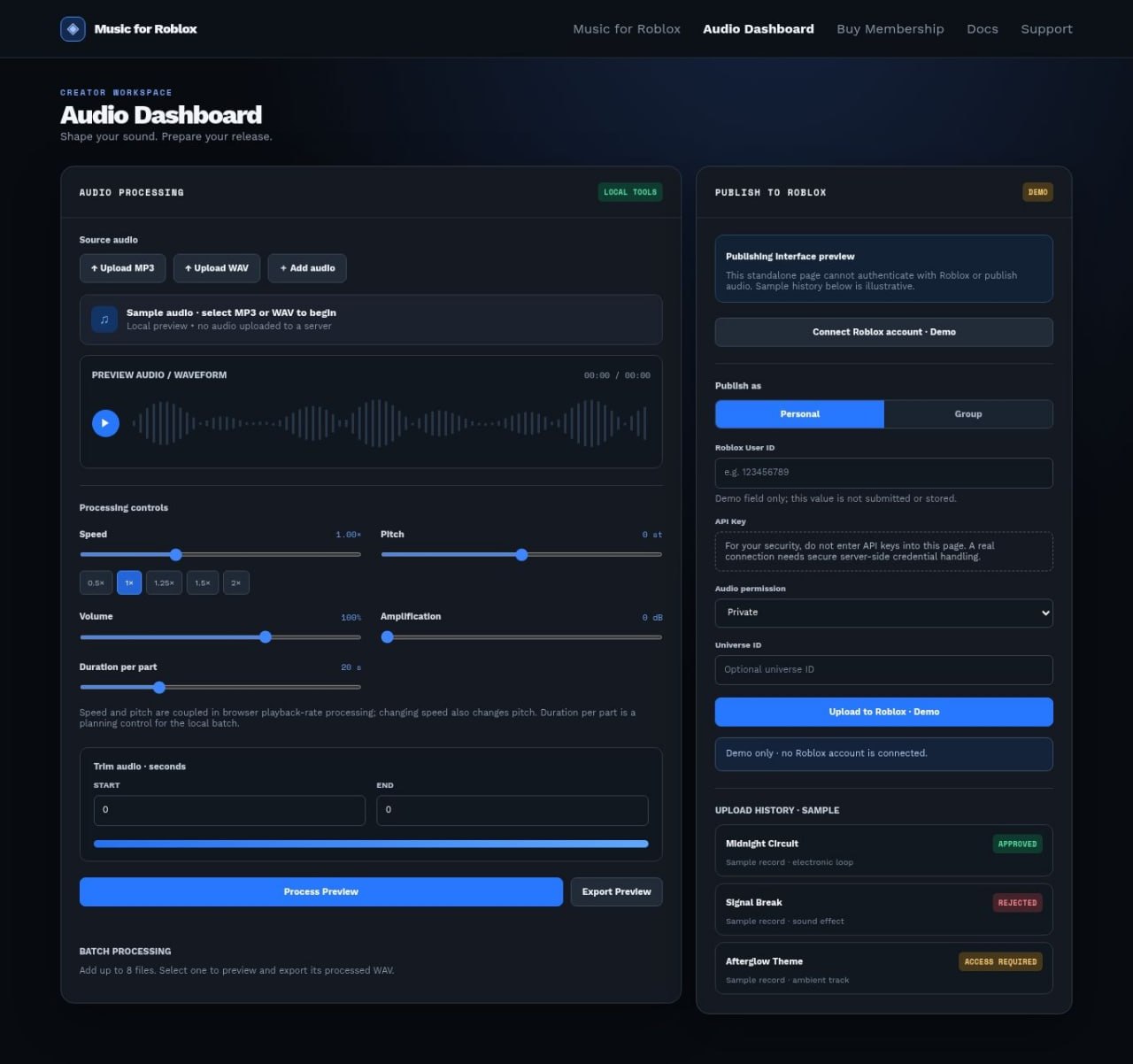
Process, preview, and publish your audio to Roblox with a simple creator-focused workflow.
Professional audio processing tools built specifically for Roblox creators. Prepare your sound perfectly before it goes live.
Real-time waveform preview so you can hear exactly how it will sound in-game.
From 1x to 2.7x. Includes recommended presets that perfectly match Roblox playback limits.
Fine-tune every detail including Amplification (dB) with precise sliders.
Cut audio precisely and process multiple tracks at once without breaking a sweat.
Connect your personal Roblox account and upload audio in seconds. No complex configurations.
Strictly personal ownership ensuring the highest security and compliance.
Use your Roblox User ID and API Key. We provide a complete step-by-step guide for audio permissions.
See real-time status of every upload with instant Processing, Approved, or Rejected feedback.
Drag & drop your tracks directly into the workspace.
Apply speed, pitch, volume, and trim. Preview the final result instantly.
Connect your personal account and publish with one click.
Get started today and turn your tracks into Roblox-ready assets in minutes.